Tuesday, April 13, 2010

Microsoft Gets Social With New Kin Phones

SAN FRANCISCO — If you’re on Facebook 24/7, love music and take photos constantly, you’re probably under 25 — and you’re right in the demographic bull’s-eye for Microsoft’s two new social-media–centric phones.

The company launched the two phones Monday that are based on a new flavor of Microsoft’s upcoming mobile operating system, Windows Phone 7. The phones, called the Kin One and Kin Two, come with an entirely new interface that puts social services such as Facebook, Twitter and newsfeeds at its core.

“If you are focused on social connection, self expression and a digital life, how do you bring that to a phone?” says Robbie Bach, president for entertainment and devices division at Microsoft. “As we were working on Windows Phone 7, we decided we had an opportunity to go after this social group of people?”

The phones have been manufactured by Sharp and will be available on Verizon’s Wireless network in May and on Vodafone in Europe later this year. Kin One is a petite, rounded device with a 2.1-inch screen. Kin Two is a larger, palm-sized device with a 3.5-inch display.

Kin One has a 5-megapixel camera, while Kin Two sports an 8-megapixel camera. Both phones have multitouch displays, an accelerometer and video-recording capability, as well as hardware keyboards that slide out from underneath the screen.

Phones that integrate closely with social networking sites have been a huge trend with handset makers in the last two years. Almost every major phone maker, including Motorola and HTC, has phones that integrate Twitter, Facebook, Flickr, MySpace and newsfeeds into a single stream on the phone’s display.

Microsoft’s latest phones are based on the concept of sharing, and try to bring the PC and the phone closer, say company reps.

The phones use some components from the company’s latest operating system, Windows Phone 7. But it isn’t exactly the same OS that powers this device, says Bach.

Think of it as a fork in the road for Windows Mobile 7, where Microsoft has taken some components from the OS and added a new interface layer to create the Kin phone, says Microsoft.

Kin phones will have three home screens. The first includes access to e-mail, phone, newsfeeds, photos and browser. Swipe to the left and the next screen throws up a stream of status messages updated from contacts and newsfeeds. Swipe to the left once more and the third screen is a list of favorites marked by the phone users and what their social status says right then.

Microsoft is late to this party. though. Rivals such as Motorola and HTC have already done this with the MotoBlur and the HTC Sense interface, respectively.

What makes the Kin different, says Microsoft, is that it automatically backs up all its contents on a password-protected website. This idea of storing information in the cloud means users can access their photos, videos, messages and even call history from a browser anywhere and don’t have to just depend on their phone.

The service offers unlimited storage, says Microsoft and will be free.

Kin also integrates Microsoft’s Zune digital music service. The phone’s music player has the same interface as the Zune HD. It also includes access only to Bing search.

Developers, however, won’t be able to create apps for the new phones.

Microsoft has not yet announced prices for the two new phones, which will be available from Verizon in May.

This closeup of the Kin One shows it with the keyboard hidden.  Photo courtesy Microsoft.

This closeup of the Kin One shows it with the keyboard hidden. Photo courtesy Microsoft.

And here's the Kin One with keyboard open. Photo courtesy  Microsoft.

And here's the Kin One with keyboard open. Photo courtesy Microsoft.

Kin One can be used to compose text messages. Photo courtesy  Microsoft.

Kin One can be used to compose text messages. Photo courtesy Microsoft.

A Kin Two with keyboard closed sits in its hoped-for natural  habitat: a coffeeshop table. Photo courtesy Microsoft.

A Kin Two with keyboard closed sits in its hoped-for natural habitat: a coffeeshop table. Photo courtesy Microsoft.

This Kin Two has its keyboard open and exposed. Photo courtesy  Microsoft.

This Kin Two has its keyboard open and exposed. Photo courtesy Microsoft.

Top photo courtesy Microsoft.

How Not to Plan Your Trip


How to plan your trip?


Sit down together a month before, select for places according to interest, select through memories, asking from someone close, search through the pages of newspaper, magazines, internet, etc. Huh, so many places to visit, I don't know what to select what not to select...Gosh...Shall I go to this place, no no... this friend of mine said that it is not so exciting. Okay, now what, this place also looks good but my Aunt suggested me this place... Too many options, but I am outta mind... I can't decide...

Finally, after a week of running through various memories (of Aunt, friends, etc), pages (of net, mag, newspapers), Chalo, we have decided that we can go to this place.

Now need to decide how many days I can get holidays from my Fking Office... Hello... Sir, I am ... I would like to get 1 week holidays from ...date to ... date. What, its not possible, see we have this work pending, projects pending, clients are shitting on my head... Can't allow you the leave. But Sir, its urgent, I need it... Sorry, you need to understand my situation, I can't allow leave at this moment...


So, finally, this Boss is now Hari Sadu... So, what is my option now.. :'( Okay, so next step is, to look for other spot which can be covered in few less days...

How not to plan your trip?

Com'n guys, is this the way you plan your trip!!! Nahhhh....I don't...

Well, let me tell you our (My friends and me) way of planning. Night 10 PM... Okay, have nice food, go to bed at 12 or 1. Sleep nicely, and suddenly, morning 5 AM. Ahh...its so boring yaar... Com'n get up and we will go to ...'s house for this weekend.


Get ready in 10mins and we are on bike to ...'s house... in 2-30mins, wake up man, how much you guys will sleep???

Kya hua...saale....subah subah... Why you guys are here, we have slept at 4AM... Did we tell you not to sleep at 12? Now get up and get ready, we have come to your room for morning trip... WTF... you guys are mad...no plan, nothing and what trip!!!

Who knows the answer for this "what trip". No problem, get up and get ready, then we will plan where to go. Hullah... we all are ready, bags ready, bike ready...lets go...who knows where...but lets go... Now we are on bike...Now tell me which is the nearest place to Bangalore where we can enjoy water, nature and can come back by Sunday night... Ooty...nahh...this...nahh...that...nahh.. So, we are still planning and we are out of city... 60kms traveled. Hey, lets have some snacks...we are hungry. Some smoke, tea and what...we don't have plan yet, which place we are going...


Now, let us see what are the places which we will encounter on this road. Okay, we can reach to Mysore, hey there is a short way from this side, and we can be on Goa road... How far it is...300 kms...by evening 6 we will be in Goa beach...Nahh...we will reach there but will have problem in returning back... We can't drive back... So, we haven't decided yet.


We are cruising on our bike...70-80-90-95kmph... Hey, don't look at each other...else we will not be able to decide and we will finally one the way to Goa...Hmmm...plan is good... If we don't plan anything, we will land on Goa beaches...


Lets stop for some water and smoke... Hello, uncle what place it is? ABCD.... Okay, thank you uncle...


Someone shouts, hey... there is a place nearby... its good...we have river, good place to enjoy and can stop there for give a luck. Okay, so lets change our course... We are on the narrow road from highway... Still, 0n 70iesssssssssssss kmph... Wallaa.... we are on the spot...nah...lets go little dipper to explore better place... So, finally we are on the spot...


After half and hour of exploring the place best suited for our fun...hurray, this place looks awesome... Lets change to minimal cloth and jump in water... wow... its so nice to be in water... 2-3 hrs in the water... Okay...it was great place to hang out... Now lets move, we need some food to make our stomach feel, we haven't forgotten it...


After nice food...chalo...we had a nice short trip...now we are tired of driving. We need to drive back to another 150kms, so lets go back... Yes, the trip was great and we enjoyed, so lets go home... Another 70-80-90kmph and we are back in Bangalore...


Tired, my back is paining, my legs are paining, my bass is paining... lets go to room... So, all are on bed and in no time we are out for another trip (of dream).


Hope, we will continue this kinda trip for long time... Long till we are bachelors. :)

Tuesday, March 16, 2010

Trip to KodaiKanal


Kodaikanal is one of the most popular hill resorts in India. It is a charming hill station, stands amidst sylvan beauty on the southern crest of the upper Palani Hills near Madurai in Tamil Nadu. With its rocks, woods, lovely lake and bracing air, Kodaikanal is an ideal hill resort for the tourists.

The unique flowering plant 'Kurunji'(Strobilanthus Kunthanus) that last bloomed in 2004, is nature's gift to Kodaikanal. Kodaikanal located amidst the folds of the verdant Pali hills is one of the most popular serene hill stations in India, which mesmerises any visitor and is frequented all through the year.

Kodai is situated at an altitude of about 2,133-m high and covers an area of 21.45-sq-km. The hill town is renowned for its educational institutions of international repute. The hill-plantain fruits and plums are known for their freshness and taste. Berijam lake, one among the beautiful lakes of South India, spreads over an area of 24 hectares. (kodaikanal.com)


More here

Wednesday, February 03, 2010

Steve Jobs’ iPad with iSight Camera?

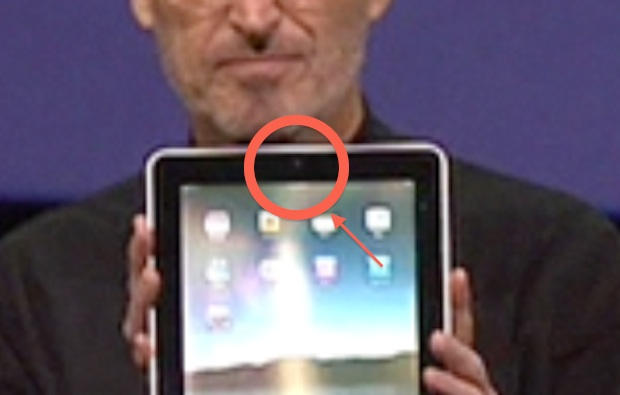
Sharp-eyed observers have noticed what looks to be an iSight camera in the iPad Steve Jobs used in last week’s keynote.


Even though Jobs didn’t talk about a camera, and it’s not mentioned in Apple’s official tech specs, something that looks like an iSight camera can be seen when Jobs first holds the iPad up for everyone to see.


As he holds it up, the light catches the iPad’s surface, illuminating something underneath. That something looks like an iSight camera, similar to the ones built into MacBooks, under the screens.


In the official iPad podcast, it can be seen around the 1:23:40 mark.


It’s not conclusive, of course, but corroborates the prototype images published by Engadget in the run up to the event, which clearly show an iSight camera in the same position. And references to a camera have been found in both the iPad’s Address Book software and the iPad firmware.


The absence of a camera on the iPad has been one of the device’s most puzzling omissions. Although, as our own John Brownlee first noted, a camera in a tablet that’s sitting in your lap, staring up at you, doesn’t produce the most flattering camera angles.


UPDATE: A repair company called Mission Repair says the iPad’s frame clearly shows an empty spot for an iSight camera, and it is exactly the same size and shape as the iSight slot in a MacBook’s screen frame. (Mission Repair received a shipment of iPad parts on Monday, the company blog says).


Thanks NyxoLyno.

Posted by Leander Kahney

8 Reasons why Netbook better than iPad


TOI

Is iPad the new Netbook? Not really say analysts. Not that Apple positioned it as one, but with the device positioned between a laptop and smartphone, comparisons are natural.

However, according to Netbook lovers iPad is anything but a competition to Netbooks. Here's why.

Just like all other Apple products, battery of iPad is fixed and irreplacable. While there is no such hassle in Netbooks. All Netbooks allow you to change the battery. Not only this, you can also upgrade your three-cell battery to a six-cell battery or more.

While Steve Jobs promised 'the best Web experience' in iPad, it does have a few critical pieces missing. Brwoser-based apps and Flash are big part of Web experience and right now it's not even clear whether iPad can even run Hulu.

A physical keyboard is what some might be used to, as it eases typing and is a boon for those who have to do a lot of typing text - like while chatting or writing long business documents. Netbooks come with a physical keyboard, the touch-keypad of the iPad has left critics wondering how comfortable a user will feel when he needs to do some heavy-dose typing. Also, though iPad has a dock for a keyboard, but it also means additional expense.

Apple hasn't given the option or the flexibility for users to be able to install software from discs or even through USB-based flash drives. While Netbook users can download, install, applications from DVDs/CDs or USB drives even without an optical drive built in.

iPad's wireless and portable. However, Apple iPad has no USB ports. This means if you want to connect say a camera, printer or even a USB, you would need an adapter for it. In comparison, all Netbooks have a minimum of 2 USB ports as standard.

Even the most basic Netbook has a 160GB hard drive. However, iPad comes with a maximum of 64 GB memory. Cloud storage can assist with data, but it's still no replacement for onboard memory.

Analysts seem to be missing camera in iPad. No camera means no scope for Web chats or videoconferencing. In comparison, most Netbooks come with an in-built web camera.

Users can upgrade the RAM of Netbooks (though slightly). However, there is no such luxury in iPad, once you have picked your model -- 16, 32 or 64GB -- there's no going back.